
TSF Launcher 3D Shell3.9.4 - Get APK
You'll be able to download in few seconds.
Publisher Description
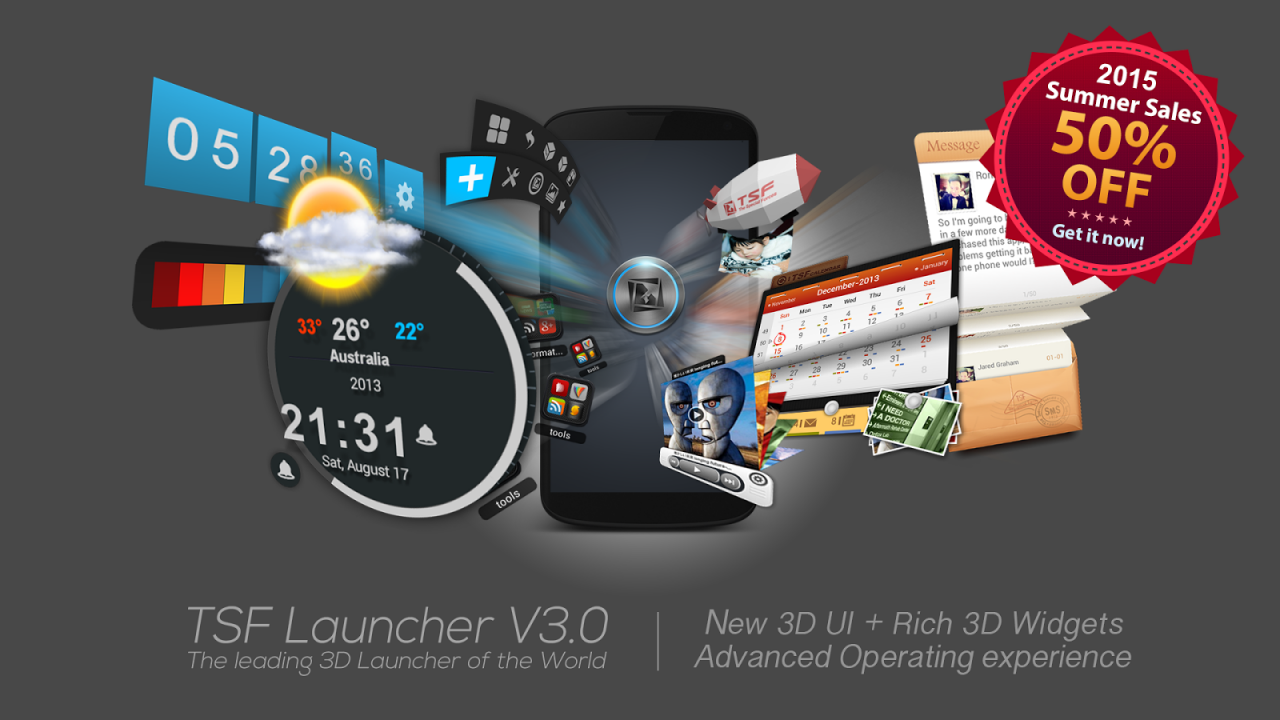
TSF Launcher is a brand-new 3D launcher that will subvert your concept of the mobile device home screen operations. It offers smooth, unique and customized man-machine interactive operation experience. You are allowed to define all the elements of the home screen freely and efficiently. TSF Launcher keeps creating new features and exclusive 3D widgets that will bring you amazing operation experience and unprecedented visual.
Main features:
========================
1.Fantastic animation transition effects. All operations, including deletion, addition, menu showing-up or vanishing, are provided with natural, glaring and butter-smooth animation transition effects.
2.Miraculous and effective 3D home screen switching mode and freewheeling home screen element layout mode. More than 10 independent layout home screens supported.
3.Unlimited dock bar. Ability to change its position, length and angle as well as to modify the size and the status (hidden or showed) of icons and folders in the dock bar. You can open the apps and the folders in the dock bar with wave-sliding mode.
4.Batch icon selecting for home screens, folders and dock bar.
5.More than 10 TSF Launcher exclusive widgets, such as Message, Clock, Weather, Memo, Music, Gallery etc. All 3D widgets provide unique visual and operative experience.
6.More than 9 gestures supported for Android shortcuts, e.g. app launching, phone call, sms, as well as TSF Launcher shortcuts, e.g. home screen switching, status bar hiding, TSF Launcher side bar hiding.
7.TSF Launcher Arch Shortcut Menu with special animation effects and operative experience. Ability to complete quick custom shortcut operations on any home screen.
8.Pioneering icon editing tool. Ability to customize icon back image, upon image, text label style, etc.
9.Many nice free third-party themes are available.
10.Funny and intuitive TSF Launcher settings menu. You can preview the corresponding settings directly.
========================
We are working constantly to improve TSF Launcher. We update our product and widgets regularly. Please check for updates often to insure you receive the best experience.
========================
■ Follow Us
Facebook: https://www.facebook.com/tsfapp
Twitter: https://twitter.com/tsfapp
Google+: http://gplus.to/tsf
■ Contact Us
E-mail: service@tsfui.com
Privacy Policy:
http://www.cmcm.com/protocol/site/privacy.html
TOS Privacy:
http://www.cmcm.com/protocol/site/tos.html
Ad Choice:
http://www.cmcm.com/protocol/site/ad-choice.html
We welcome any comments or suggestions to improve our product.
"
About TSF Launcher 3D Shell
The company that develops TSF Launcher 3D Shell is Launcher 3D Pro. The latest version released by its developer is 3.9.4.
To install TSF Launcher 3D Shell on your Android device, just click the green Continue To App button above to start the installation process. The app is listed on our website since 2019-02-23 and was downloaded 0 times. We have already checked if the download link is safe, however for your own protection we recommend that you scan the downloaded app with your antivirus. Your antivirus may detect the TSF Launcher 3D Shell as malware as malware if the download link to com.tsf.shell is broken.
How to install TSF Launcher 3D Shell on your Android device:
- Click on the Continue To App button on our website. This will redirect you to Google Play.
- Once the TSF Launcher 3D Shell is shown in the Google Play listing of your Android device, you can start its download and installation. Tap on the Install button located below the search bar and to the right of the app icon.
- A pop-up window with the permissions required by TSF Launcher 3D Shell will be shown. Click on Accept to continue the process.
- TSF Launcher 3D Shell will be downloaded onto your device, displaying a progress. Once the download completes, the installation will start and you'll get a notification after the installation is finished.
Program Details
System requirements
Download information
Pricing
Version History
version 3.9.4
posted on 2019-02-23
[Bugfix]Target API level 21-> 26
version 3.9.1
posted on 2017-10-06
Updated AdChoice
version 3.8.5
posted on 2015-12-10
V3.8.3 (2015/11/27),New: Allowing blur wallpaper.,V3.7.1 (2015/7/17),New: App Drawer Bottom Menu Toggle,New: "All Apps" Position Settings(Left/Right),Fixed: Known bugs,V3.7 (2015/7/15),New interface for All Apps,New orientation settings for Quick Contacts/ Recently used Menu,New Floating Button Settings,New Arrangement Tool,Improved: Default Theme,Fixed: Floating Button disappearing issue,Fixed: System widget no refreshing issue for some devices,Fixed: Sorting issue in AppDrawer
version 1.9.9.5.4
posted on 2013-06-19
Several fixes and updates
Disclaimer
External Download
We do not host TSF Launcher 3D Shell on our servers. We did not scan it for viruses, adware, spyware or other type of malware. This app is hosted by Galad and passed their terms and conditions to be listed there. We recommend caution when installing it.
The APK Download link for TSF Launcher 3D Shell is provided to you by apps112.com without any warranties, representations or guarantees of any kind, so access it at your own risk.
If you have questions regarding this particular app contact the publisher directly. For questions about the functionalities of apps112.com contact us.
